Awesome clicks captured by Digital Camera
 |
| Awesome Clicks Captured By Digital Cameras |
Capture Beautiful Pictures Through Digital Cameras:
Yes! You can capture beautiful pictues through digital cameras as I describe it clearly on my previous post.Having a great camera won't make you a professional photographer it needs time and experience, If I've expensive pen so it doesn't make me an author.Photograph always tells a story you can see it on bellow pictures.
Want To Capture Photographs Like These?
Continue Reading Here...... |
| Beautiful picture of sunshine Awesome click captured by digital camera |
 |
| Best exposure in daylight Awesome click captured by digital camera |
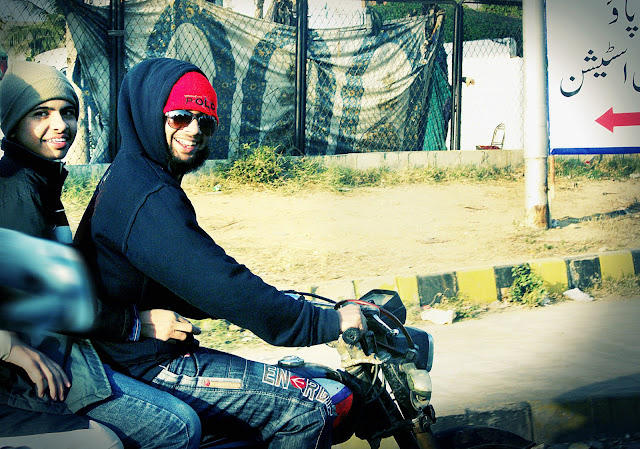 |
| Perfect story Captured By Digital Camera |
 |
| Leaves Photography Awesome click captured by digital camera |
 |
| Cat photography Awesome click captured by digital camera |
 |
| Cat photography Awesome click captured by digital camera |
 |
| Bokeh capture, macro shot of leaves |
How to Capture Beautiful Photos From Digital Camera
 |
| Beginners please be hurry up punch DSLR away |
Everyday is a rainy day for me. :D Cause everyday I'm being blessed by Allah.
Well its to hard to leave a great camera even though all beginners as well as me also love DSLR cameras
BUT WHY I'M SAYING TO LEAVE IT?
All beginners love to use DSLR cameras but the mentality behind that they get wide pixel images and they're not addict to use it (They are also trying to be sound sophisticated like professional photographers) so its better to use Digital Cameras at the beginning even when you don't have any experience.Why Only Digital Cameras?
Digital Cameras are always convenient to use when you're at first stage of Photography and having a continual problems.All cameras expect digital cameras are too much difficult to use so its always better to use digital cameras using DSLR cameras or other may be led you to hate photography.Sometimes or someday shall be comes in your life and then you'll hate it.Tactics Of Photography:-
Understanding Photography? Its quite easy to learn even when you're amateur photographer this will be pretty good of you then by time you'll learn it easily.Anyhow, In this paragraph I want to elaborate that photography isn't a big deal its all about concepts "THE WAY YOU ARE" having great cameras can't make you a professional photographer that's why I'm preferring you to use digital cameras cause at the start of photography it will be very helpful to you.
Whats so good in Digital Cameras?
Photography always tells a story don't resolution or how much good it is looking
if you have some great moments try to capture it in a great way that will makes your
photo looks good.And then by time its probably so easy for you to take
good pictures.
if you have some great moments try to capture it in a great way that will makes your
photo looks good.And then by time its probably so easy for you to take
good pictures.
5 Tips To Capture Good Images Through Digital Camera
- Make sure your camera is always with you all the time.
- Stay calm, Try to find some awesome moments.
- Take care of your camera, And always check your camera setting with respect to moment.
- Find some elegant places.
- Take pictures as much as you can in different ways.
Tag :
Photography Tips
5 Beautiful Inspirational Work- Before & After On Adobe Photoshop
 |
| 5 Beautiful Inspirational Work- Before & After On Adobe Photoshop |
Hello Folks!
Not like all great photos but these photographs are captured by my female friends (Photographer).
No matter how you guys guess what I'd done in these photos but if you still want some knowledge about it you guys can check my previous post which is about "TRICKS OF ALL BEFORE & AFTER".
 |
| Before Picture |
|
| After |
 |
| After |
 |
| Before |
 |
| After |
 |
| Before |
 |
| After |
 |
| Before |
 |
| Before |
 |
| After |
Tag :
Inspirational Work
5 Amazing Tricks of All Before & After
 |
| 5 Amazing Tricks of All Before & After |
First of all I'm getting start from "LEVELS".
Levels:
This is one of the beautiful tool I used in every picture.
But why I used it? Well because it gives me great look even
when I've many other tools like Brightness & Contrast,
Curves,Selective Colours and Solid Colours.Levels is
one of the most important tool, However, we cannot neglect any other of them somehow we use all tools to get an Elegant photo.Behind the reason of beauty of levels is that it give me the perfect look which I want to see in every great photo. Mostly I used to Light up the focus part of the picture and to get
the nerd surface more darker.This give me a perfect professional editing look.Curves,Selective Colours and Solid Colours.Levels is
one of the most important tool, However, we cannot neglect any other of them somehow we use all tools to get an Elegant photo.Behind the reason of beauty of levels is that it give me the perfect look which I want to see in every great photo. Mostly I used to Light up the focus part of the picture and to get
Brightness & Contrast:
It add much good things to picture from my experience
yes! I can say it is essential to use.It also involves with "LEVELS" as these toolsare used to enhance picture quality.The classical method of using Brightness &
Contrast is to increase brightness with respect to contrast, Contrast must be little
bit higher then brightness.
Curves:
It add colours to the picture but ain't like Solid Colours or Selective Coloursthey are totally different.Curves is the best thing you have to done in your
pictures as it adds effects and it is now depend on you which type of effect
you want to give to your photos.The beauty of it is totally depend on you well
my critiques are so helpful to you look be creative, stay calm, don't worry
and also find some inspirational work then see the inspirational picture what that
he\she done in picture.
Solid Colours (Optional):
This tool isn't for all pictures as it add some cool colours to the pictureI use it some times when I really need of it.But anyhow, I never
over it because picture will be look uglier then before.The beauty of it
is in to change the blend option of "Solid Colours" "Normal" to "Soft Light".
Selective Colours (Optional):
This tool isn't necessary all the time but improving two or three colours like
Red,Blue & Green is even better then master colour.
Tips For Before & After:-
1.Look at some inspirational work.2.Be creative yourself.
3.Add some colours like I've done in below picture.
4.Do not edit too much, it will be look uglier then before.
 |
| After |
 |
| Before |
Tag :
Before And After
How to put cool effects in your Pictures Using Photoshop Actions - Before & After
 |
| Before & After |
Hello folks!
Sorry I know I'm too late to post this post,But anyhow I found my week so cool as all the time I was sleeping,Actually I fell in LOVE with my bed. Huh huh!
Sorry I know I'm too late to post this post,But anyhow I found my week so cool as all the time I was sleeping,Actually I fell in LOVE with my bed. Huh huh!
Even though, I was sleeping but it doesn't mean I waste my time in nerd thing because when I sleep I always wonder something new or how can I provide best which is so helpful for you.
Guess what?
In this week I wonder about Before & After as you know quite about it.In before & after we use some actions along with some other stuff!
 |
| Before |
Isn't look cool edit?
As I want my picture to look cool, so therefore I did work hard for it.Because at the start I knew that this boy look stylish with cool colors.
 |
| After |
Before you go ahead look at this picture as it showed complete black and white picture.One question probably raise in your mind that is,"Why I do it black & white".Because my object and his accessories look good in black and white as compare to colors.Want to see what I do?
Download my action HERE WARNING: Don't use this action in any other photo.
How to Add Neon Glow in your Pictures?

Neon glow is not a big deal it is so easy to do, goto to the curves and choose the color you want to add it like neon then enhance it using curve now probably you need more enhancement so that you need to select SOLID COLORS then select the color what you desire to add as same as curves, then play with it "kindly change the blend mode to soft light" when you are satisfy with your colors go and change the brightness & contrast of your photo.Your photo will be in disarray if you don't do it correctly for instance if you add to much colors in your picture it will be look too weird.
Xoxo Big Hugs Give Us Feed Back In Comment Box :)
Xoxo Big Hugs Give Us Feed Back In Comment Box :)
Tag :
Before And After


